Claude + Robinhood Agentic Trading
I let an AI near my trading account. Here's how I kept the bumpers up.
Remember why I got into AI in the first place? Investing. This is where that road led. In late May, Robinhood opened a beta called Agentic Trading that lets you connect an AI like Claude straight to a brokerage account. Claude can pull prices, read the charts, dig into a company's numbers, and place real trades.
That sounds a little scary, and it should. So I set it up like bowling with the bumpers up. The AI gets to roll the ball, but there's no way for it to end up in the gutter of my main savings. Here's exactly how I did it.
Setting it up, step by step
- Start with a regular Robinhood account. You need a normal individual investing account in good standing first. Plan on doing the setup at a computer, because Robinhood currently requires desktop for this part.
- Connect Claude. In Claude's settings, go to Connectors and add a custom connector. Paste in Robinhood's trading link, which Robinhood shows you during the Agentic setup. You'll sign in on Robinhood's own page and confirm on your phone, so Claude never sees your password.
- Open and fund the Agentic account. Robinhood walks you through creating a separate Agentic account. Move in only what you can afford to lose. Whatever's in there is the most the AI can ever spend.
- Set your rules before your first trade. Tell Claude in plain English how much risk you want and what your rules are, then have it repeat them back to you. Keep a copy of your rules saved somewhere so you can paste them into a new chat.
My bumpers
These are the rules I trade by. Steal them, tweak them, but have some.
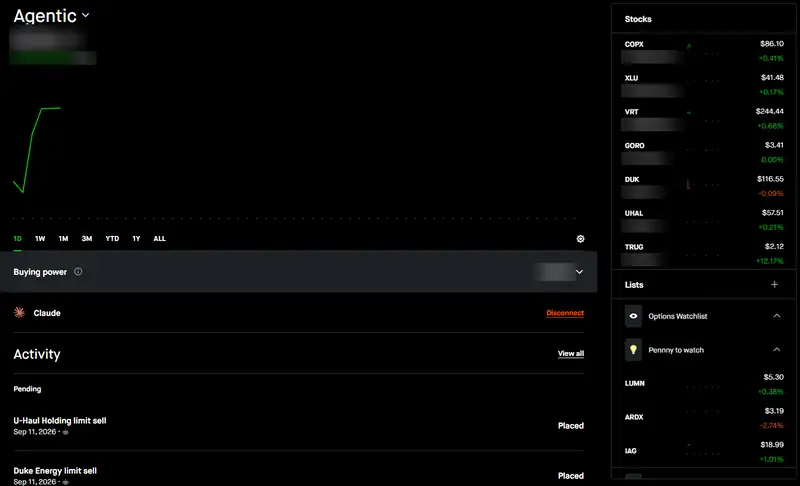
- A walled-off account. Claude can only trade inside the Agentic account. My main money isn't in play.
- I approve every trade. Claude researches, screens, and makes the case. Nothing gets bought or sold until I say yes. No autopilot.
- A stop-loss on every short-term trade. Mine sits about 2% under my buy price, so a bad pick costs a little, not a lot.
- Only trades worth the risk. The possible gain should be at least twice the possible loss.
- Limit orders. I set the price I'm willing to pay so a fast market doesn't fill me at a surprise price.
- A cap on any one trade. Decide up front the most of your account a single trade can use.
- No good data, no trade. If the numbers look missing or off, Claude holds instead of guessing.
- Separate buckets, separate rules. Short-term swing trades get tight stops. A medium-term bucket holds for at least three months with a specific reason behind it. A long-term bucket gets small weekly buys and no stop-loss.
- No options, for now. Options move fast, and an approve-every-trade setup is too slow for them.
What it looks like
Here's my actual Agentic account. Claude is connected, and those limit sells in the Activity list are orders it set up and I approved. I blurred the dollar amounts and share counts. The point is the setup, not my balance.
Do the bumpers actually work?
My first two trades both hit their stop-losses within days. Small losses, exactly as planned. That's the whole point. The bumper did its job, and I lived to trade again.
Since then I've picked up a better habit: when a trade goes my way, I move the stop-loss up behind it. Once a stock climbs far enough, the stop sits at or above what I paid, so the worst case is breaking even. Claude helps me keep track and reset those stops as prices move.
Related on this site
The ups
- Charts, earnings, and analyst ratings in one conversation, in minutes instead of an evening
- The separate account keeps the AI fenced away from your main money
- You set the rules in plain English, and it works inside them
- Places limit orders and stop-losses for you, and helps move stops up as a trade works
- Watchlists, price alerts, and stock scans without digging through menus
The downs
- It's still a beta. Expect some rough edges.
- Trades are fenced in, but the connected AI can still see your other Robinhood accounts and history. Know that going in.
- Approving every trade is slow. Fine for swing trades, not for anything that needs a split-second move.
- The AI can be wrong, and you can lose everything in the Agentic account. Every trade is still on you.
- A smart assistant doesn't make the market predictable. Stops will get hit.
- It can lose track of your rules between chats, so keep them written down.
Bottom line: If you're already on Robinhood and curious, this is about the most careful way to let an AI near your money: a walled-off account, a small balance, your rules, and your yes on every trade. Treat it like a research partner with a trade button, not a money printer.
Full disclosure: Claude helped me write this review. This isn't financial advice. I'm one guy with a small account sharing what I do, and you're responsible for your own trades.
Setup details checked against: Finder, Mika Reyes
More reviews
- Forced to pick, two big AIs split along party lines
- Real race, fake videos: AI ads take over the Texas Senate fight
- The first AI election: $137 million in AI-made ads, and the AI money behind the races
- How to spot an AI political ad before you vote (or share it)
- What Trump is actually doing about AI, and what Americans think of it